Diffy and Diffy Pro
Two apps from one codebase. The free one is a complete compare-and-fix tool; Pro adds the tools for moving changes around and for files that aren't plain text.
| Feature | Diffy | Diffy Pro |
|---|---|---|
| Side-by-side compare, word-level highlighting, change map, previous/next | ✓ | ✓ |
| Syntax highlighting, find, wrap, zoom, light and dark themes | ✓ | ✓ |
| Ignore whitespace (amount mode) | ✓ | ✓ |
| Edit mode, Save, Save As with encoding and line endings | ✓ | ✓ |
| Compare in Diffy on File Explorer's menu | ✓ | ✓ |
Command line: open files, --diff with exit codes | ✓ | ✓ |
| Merging — Take, Skip, All, undo | — | ✓ |
| The Reader — Markdown, HTML, PDF, outline, find & replace | — | ✓ |
| XML-aware compare | — | ✓ |
| Image compare | — | ✓ |
| Inline view | — | ✓ |
| Alignment anchors | — | ✓ |
| Patience and Classic algorithms; trim and ALL whitespace modes | — | ✓ |
| Encoding override | — | ✓ |
| HTML report and unified patch export | — | ✓ |
| Edit in Diffy Pro on File Explorer's menu; open file types with it | — | ✓ |
Pro controls in the free edition
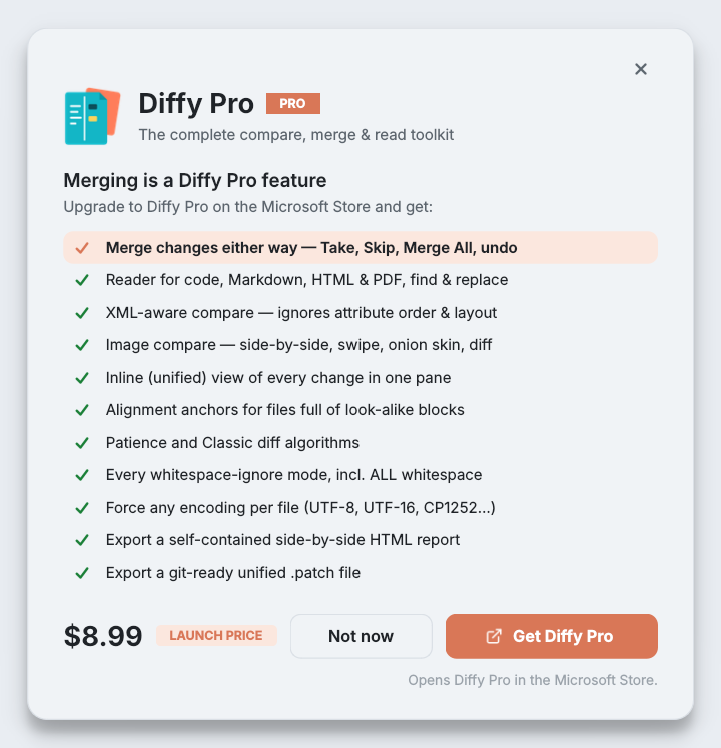
The free edition shows the Pro controls rather than hiding them (only the merge rail and its undo buttons are left out). Click one and a card names the feature you tried, lists the rest, and offers Get Diffy Pro, which opens its Microsoft Store page. Not now closes it and leaves everything as it was. Pro entries in the ⋯ menu are marked PRO.
Upgrading
Diffy Pro is a separate app on the Microsoft Store, bought once. It installs alongside the free edition and does not replace it — you can keep both, or uninstall the free one. Because the Store handles the purchase, Diffy Pro installs on your other Windows PCs signed in with the same Microsoft account. Refunds follow the Store's process; see our refund policy.
There is no licence key and no activation server. Diffy Pro never checks in with us.