Security
What Velocity Bridge does with your credentials, how it decides a server is the one you meant, and what it sends us. That last one is easy: nothing.
Trust on first use
The first time you connect to a server, Velocity Bridge has no way to know whether the machine answering is yours. So it asks you, shows you the fingerprint, and pins whatever you accept.
From then on, that server must present the same key or certificate. If it changes, you are asked again — loudly.
This is the same model OpenSSH uses, and it is the strongest thing available for SFTP, which has no certificate authorities at all.
SSH host keys
Every SSH server has a key pair. Its fingerprint is what identifies it, and the only trustworthy source for the correct value is out of band — your hosting panel, or the person who runs the machine.
Compare the fingerprint before accepting. It is a few seconds, once per server, and it is the only moment in the whole relationship where you can catch an impostor.
When a host key changes
Two explanations: the server was rebuilt or rotated its keys, or something is sitting between you and it. The second one will read your password the instant you send it.
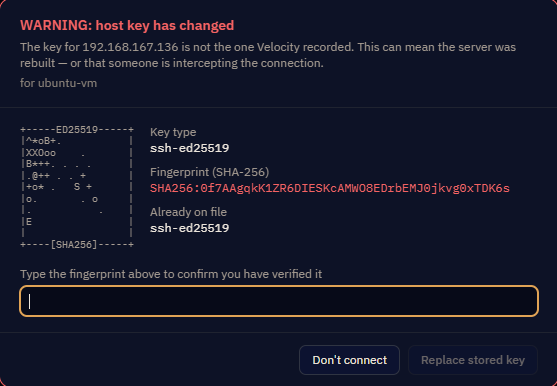
Velocity Bridge makes this deliberately awkward. It shows the new fingerprint next to the stored one, and to proceed you must type the new fingerprint out by hand. There is no "trust anyway" button.
Before you type it: ask whoever runs the server whether the key changed, and get the new value from them. Compare against what they say, not against what is on your screen.
FTPS certificates
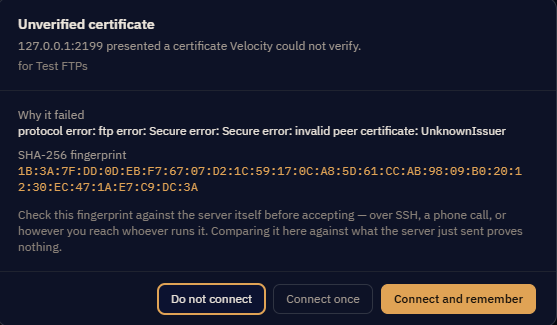
Where a certificate is signed by an authority your computer already trusts, the connection proceeds without asking. Self-signed certificates, internal CAs and expired certificates produce the Unverified certificate prompt.
Accepting pins that certificate for that host. It does not teach your system to trust the issuer generally, and it changes nothing about any other server.
Reviewing and revoking
Settings → Security lists every host key and every certificate you have accepted, with fingerprints and when you accepted them. Anything there can be revoked, after which the next connection asks again from scratch.
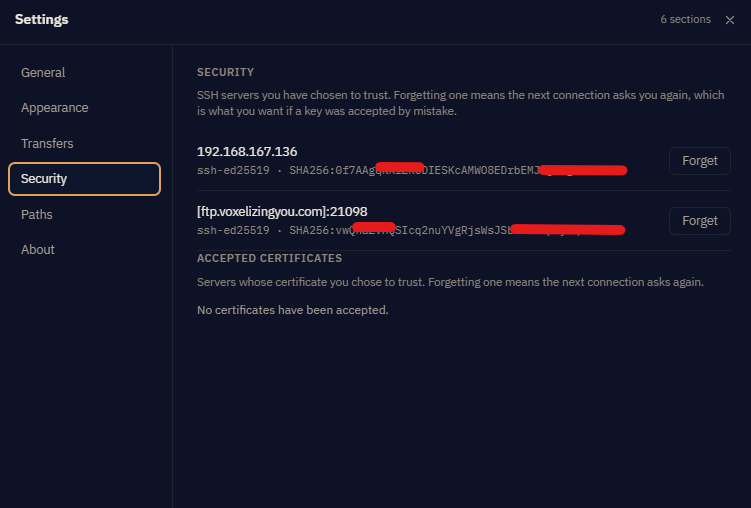
Worth a look occasionally — a key you do not recognise is worth explaining.
Where passwords live
In Windows Credential Manager, the operating system's own encrypted store, protected by your Windows account.
They are not in the app's database, its configuration files, or its logs. The session log strips passwords as it writes them rather than filtering afterwards — they never reach the file even briefly.
Passphrases and tokens held in memory are zeroed after use rather than left for whatever reads that memory next.
SSH keys
Velocity Bridge reads your key file at the path you give it. Encrypted keys prompt for the passphrase; it can be saved to Credential Manager like a password. An SSH agent is supported, in which case the key never leaves the agent at all.
If the credential store is unavailable
Rare on Windows, real on Linux — a headless machine may have no keyring, and a Snap install needs a permission granted. The app tells you which, and there is no fallback store: passwords work for the session and are forgotten on exit. Velocity Bridge will not quietly write them to a file instead.
What leaves your machine
Connections to the servers you configured, and nothing else. No analytics, no crash reporting, no account, no licence check, no update ping. The app has no telemetry to switch off because there is none to begin with.
You do not have to take that on trust. The Session Log shows every connection the app opens and every command it sends. If something were talking to us, it would be in there.
The privacy policy says the same thing in legal language.
Sensible habits
- Prefer SFTP or FTPS over plain FTP. Plain FTP sends your password and your files in the clear, readable by anything on the path. It exists in the app because some servers offer nothing else.
- Prefer keys over passwords where the server supports them.
- Check the fingerprint the first time. It is the whole security model.
- Exclude passwords from an exported bundle that will travel anywhere you do not control.
- Take screenshots carefully. A hostname in a support ticket is on the internet for a long time.