Transfers & the queue
Nothing transfers immediately. Everything goes into a queue that survives a dropped connection, a closed app and a rebooted computer — which is the point.
Why a queue at all
A transfer that runs "directly" has nowhere to record how far it got. When the link drops at 80% of a 4 GB file, there is nothing left but to start again.
Velocity Bridge writes queue state to a local database as it goes. Pause the queue, close the app, come back tomorrow, and the transfers are still there with their progress intact. That is also what makes Resume possible rather than aspirational.
Reading the queue
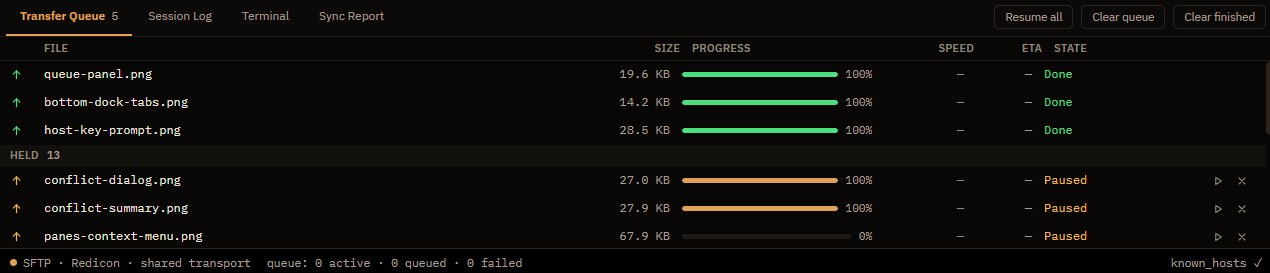
Each row is one file, with its direction, size, progress, rate, and which tab queued it. The states:
| Queued | Accepted, waiting for a slot. Normal. |
| Running | Moving now. The rate shown is for this file. |
| Held | Waiting for you — most often a conflict that needs an answer. |
| Retrying | Failed with something temporary and will try again by itself. The row says when. |
| Failed | Stopped with a permanent error. It will not retry on its own. |
| Done | Completed and verified as written. |
Why a transfer sits at "Queued"
Usually because the concurrency limit is reached and it is waiting its turn — this is the intended behaviour, not a stall. Check Settings → Transfers → Max concurrent transfers.
If nothing at all is running and items still say Queued, the likely causes are: the queue is paused (look at the toolbar), the session behind it has disconnected, or the server has refused a new data connection. The Session Log will say which.
Transient versus permanent
The distinction drives everything about retries. Velocity Bridge classifies each failure as transient — a dropped connection, a timeout, a server that is briefly too busy — or permanent, like "permission denied" or "no such directory".
Transient failures are retried automatically with an increasing delay between attempts, so a server that is briefly unavailable does not cost you a batch. Permanent failures are not retried at all, because trying "permission denied" fifty times is noise that hides the one error you needed to read.
Retry count and timing are under Settings → Transfers.
Resuming
Where the protocol supports it, an interrupted transfer continues from where it stopped rather than starting over. SFTP and most FTP servers support it; a few do not, and those restart the file.
You can also resume deliberately: if a destination file looks like a partial copy of the source, the conflict dialog offers Resume as one of its choices.
Only resume when the two files are genuinely the same file. Resume appends from a byte offset. Pointing it at a destination that is actually a different file produces a file that is the front of one and the back of the other, with no error at any stage. If in doubt, overwrite.
Controlling the queue
| Pause / resume all | Stops starting new transfers. Running ones finish. Handy when you need the bandwidth for something else. |
| Cancel | Per item or for everything. A cancelled upload may leave a partial file on the server — Velocity Bridge does not delete it for you, because guessing wrong there means deleting something real. |
| Retry | Re-queues a failed item without re-selecting it in the pane. |
| Clear finished | Tidies completed rows. Nothing on disk changes. |
| Reorder | Drag a row to change its priority. |
Speed, and what actually limits it
Raising Max concurrent transfers helps considerably with many small files, where per-file setup dominates, and helps very little with one large file, where a single stream already saturates the link.
It can also make things worse: some servers limit connections per user and will refuse or throttle the extras. If a higher number produces more errors rather than more speed, that is what is happening — put it back.
Other honest limits: your upload bandwidth is usually far smaller than your download, an FTP server negotiating TLS for every data connection pays that cost per file, and a server under load is a server under load.
Verifying
Transfers are checked for completeness as they finish — a file that ends short is reported as failed rather than silently accepted. This is the behaviour the kill-and-resume tests exist to keep honest: interrupt a transfer at an arbitrary point, resume it, and the result must match the source byte for byte.